

1.组网需求
dut1-单机与dut2-VSU分别属于不同的子网,其中dut2-VSU和ZAM服务器属于同一个网段,dut1-单机和ZAM服务器属于不同的网段,要求dut1-单机和dut2-VSU通过零配置功能,实现自动升级和下发配置,要求:
l配置ssh功能,使得网管可以通过ssh远程管理设备,并且要求配置密文密码,密码长度不少于8个字符,要保护字母、数据和特殊字符。dut1-单机和dut2vsu的用户名和密码不能一样。
2. 组网图
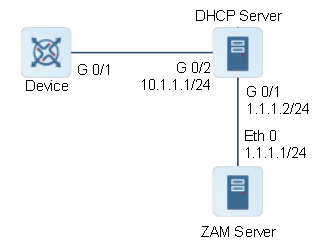
图1 ZAM组网图
3.配置要点
l配置DHCP服务器。
l配置ZAM服务器。
l在设备上执行ZAM功能。
4.配置步骤
(1)配置DHCP服务器。
#配置DHCP服务器GigabitEthernet 0/1接口的IP地址为1.1.1.2/24。
Dhcp_Server> enable
Dhcp_Server# configure terminal
Dhcp_Server(config)#interface gigabitEthernet 0/1
Dhcp_Server(config-if-GigabitEthernet 0/1)# ip address 1.1.1.2 255.255.255.0
Dhcp_Server(config-if-GigabitEthernet 0/1)# exit
#配置DHCP服务器GigabitEthernet 0/2接口的IP地址为10.1.1.1/24。
Dhcp_Server(config)#interface gigabitEthernet 0/2
Dhcp_Server(config-if-GigabitEthernet 0/2)# ip address 10.1.1.1 255.255.255.0
Dhcp_Server(config-if-GigabitEthernet 0/2)# exit
#开启DHCP服务器功能。
Dhcp_Server(config)# service dhcp
#配置DHCP服务器地址池。
Dhcp_Server(config)# ip dhcp pool zam
Dhcp_Server(dhcp-config)# network 10.1.1.1 255.255.255.0
Dhcp_Server(dhcp-config)# default-router 10.1.1.1
# option 66选项。
Dhcp_Server(dhcp-config)# option 66 ascii 1.1.1.1
# option 67选项。
Dhcp_Server(dhcp-config)# option 67 ascii zam.py
(2)配置ZAM服务器。将中间文件(名称为zam.py的Python脚本)、要下发到设备上的配置文件和版本文件存放在ZAM Server上。具体内容参见1.3.3配置准备
(3)在设备上执行ZAM功能。
#删除设备上的配置文件。
Device# delete config.text
Do you want to delete [flash:/config.text]? [Y/N]:y
Delete success.
#通过reload命令重启设备,开始执行ZAM功能。
Device# reload
Reload system?(Y/N)y
Device#[1042947.400971] %SYS-0-REBOOT: Rebooting by job: dp_mom_thread/3877
U-Boot 1.4.12--g1b6cd5f (Dec 17 2019 - 21:58:43 +0800)
I2C:ready
DRAM:1 GiB
NAND:512 MiB
......
......
*May 13 15:47:36: %ZAM-6-EVENT: Get tftp server ip 1.1.1.1.
*May 13 15:47:36: %IPMIX-6-ADDRESS_ASSIGN: Interface VLAN 1 assigned DHCP address 10.1.1.2, mask 255.255.255.0.
*May 13 15:47:36: %ZAM-6-EVENT: Get boot file name zam.py.
*May 13 15:47:42: %ZAM-6-EVENT: Download script success, rename to zam.py.
*May 13 15:47:42: %ZAM-6-INFO: Begin to exec script zam.py.
Thu May 13 15:47:46 2021 INFO: script(version:1.0.12440) running...
Thu May 13 15:47:46 2021 DEBUG: server ip: 1.1.1.1, port type: SVI
Thu May 13 15:47:46 2021 DEBUG: current version: S5300E_RGOS12.5(4)
Thu May 13 15:47:46 2021 DEBUG: current patch: NA
Thu May 13 15:47:47 2021 DEBUG: execute upload command: copy flash:/G1NQ7UW700483.POAP tftp://1.1.1.1/POAP_STARTUP/G1NQ7UW700483.POAP...
Thu May 13 15:47:47 2021 DEBUG: upload G1NQ7UW700483.POAP success
Thu May 13 15:47:47 2021 DEBUG: begin to download G1NQ7UW700483.params ...
Thu May 13 15:47:47 2021 DEBUG: execute download command: copy tftp://1.1.1.1/POAP_CFG/G1NQ7UW700483.params flash:/poap.tmp.params...
Thu May 13 15:47:48 2021 DEBUG: download G1NQ7UW700483.params success
Thu May 13 15:47:48 2021 DEBUG: parse image_name=S53E_5PL4_0329.bin
Thu May 13 15:47:48 2021 DEBUG: begin to download G1NQ7UW700483.cfg ...
Thu May 13 15:47:48 2021 DEBUG: execute download command: copy tftp://1.1.1.1/POAP_CFG/G1NQ7UW700483.cfg flash:/poap.tmp.cfg...
Thu May 13 15:47:48 2021 DEBUG: download G1NQ7UW700483.cfg success
Thu May 13 15:47:48 2021 INFO: download G1NQ7UW700483.cfg success, save to flash:/poap.tmp.cfg
Thu May 13 15:47:48 2021 INFO: begin to download S53E_5PL4_0329.bin ...
Thu May 13 15:47:48 2021 DEBUG: execute download command: copy tftp://1.1.1.1/POAP_IMAGE/S53E_5PL4_0329.bin tmp:/poap.image.bin...
Thu May 13 15:54:20 2021 DEBUG: download S53E_5PL4_0329.bin success
Thu May 13 15:54:20 2021 INFO: download S53E_5PL4_0329.bin success, save to tmp:/poap.image.bin
Thu May 13 15:54:20 2021 INFO: upgrade system begin...
Upgrade start
!!!!100%
Upgrade skip, reason: The version in device is the same
Thu May 13 15:54:43 2021 INFO: upgrade status: skip
Thu May 13 15:54:53 2021 DEBUG: rename file poap.tmp.cfg to config.text
Thu May 13 15:54:53 2021 INFO: script ending...
Thu May 13 15:54:54 2021 DEBUG: execute upload command: copy flash:/poap.tmp.log tftp://1.1.1.1/POAP_LOG/G1NQ7UW700483.LOG...
Thu May 13 15:54:55 2021 DEBUG: upload G1NQ7UW700483.LOG success
Thu May 13 15:54:56 2021 DEBUG: execute upload command: copy flash:/G1NQ7UW700483.ok tftp://1.1.1.1/POAP_STATUS/G1NQ7UW700483.ok...
Thu May 13 15:54:56 2021 DEBUG: upload G1NQ7UW700483.ok success
*May 13 15:55:00: %ZAM-6-EVENT: Script exec success, request device reset now.
*May 13 15:55:00: %DP-3-RESET_DEV: Reset device 1 due to zam reload device.
*May 13 15:55:02: %ZAM-6-EVENT: Script exec success, request device reset now.
*May 13 15:55:02: %DP-3-MACHINE_RESTART: MACHINE_RESTART.
5.验证配置结果
#通过show dhcp lease命令查看IP地址的获取结果。
Device# show dhcp lease
Temp IP addr: 0.0.0.0for peer on Interface: Mgmt 0
Tempsub net mask: 0.0.0.0
DHCP Lease server: 0.0.0.0, state: 3 Init-proc
Retry count: 7Client-ID: 01800588aba05e4D676D7430
Temp IP addr: 10.1.1.2for peer on Interface: VLAN 1
Tempsub net mask: 255.255.255.0
DHCP Lease server: 10.1.1.1, state: 9 Inform-proc
DHCP transaction id: 75cf492b
Lease: 86400 secs,Renewal: 43200 secs,Rebind: 75600 secs
Next timer fires after: 43054 secs
Retry count: 0Client-ID: 01800588aba05d564C414E31
#通过show zam命令查看零配置执行情况。
Ruijie#show zam
ZAM state:enable
ZAM status:Now is waiting for do shell exec
Server ip:1.1.1.1
Usb path:NULL
Interface name:VLAN 1
Interface type:SVI
Succ Interface name:VLAN 1
Script URL:tftp://1.1.1.1/zam.py
6.配置文件
lDHCP Server的配置文件
hostname Dhcp_Server
!
ip dhcp pool zam
option 66 ascii 1.1.1.1
option 67 ascii zam.py
network 10.1.1.0 255.255.255.0
default-router 10.1.1.1
!
end
7.常见错误
l设备与ZAM服务器之间的网络通路连接异常。
l设备的配置文件未删除。